Orchestrate AI DevBoxesacross your own machines.

A DevBox is a hardware-isolated dev environment with a live terminal, on your fleet or our cloud. Launch one from a ticket and the machine is yours to drive — or start a Run, and an agent works the ticket to a pull request inside it.

BYOM workersCloud workersOpen-core
console.clustercode.ioDashboard
ClusterCode orchestrator dashboard showing connected workers and running DevBoxes

Your whole fleet at a glance — workers, DevBoxes, runs, and schedules. Read the docs →

Isolation

Worktrees share your machine. DevBoxes don't.

Git worktrees

Great for one repo
  • Parallel branches, one checkout each
  • Still your filesystem, tools, and env
  • Capped at your one machine

Subagents

Great for one session
  • Many agents, one process
  • Share everything, output interleaves
  • Capped at one context window
★ Recommended

AI DevBox

When you want isolation + scale
  • A full disposable machine per task
  • Zero blast radius + live terminal each
  • Strict security profiles, out of the box
  • Scales across your fleet + cloud
  • The safe place for auto-mode

Worktrees and subagents are great tools — DevBoxes add hardware isolation and multi-machine scale for when you need them.

Security

"Dangerously" stops being dangerous — and you control exactly how safe.

Every agent runs in an isolated DevBox with a security profile you choose — from open experimentation to air-gapped, read-only, no-secrets compliance.

OpenStandardStrictOffline← one toggle

Isolated DevBoxes

Each agent sandboxed from host, peers & credentials.

Network egress control

Allowlist what the agent can reach. Block the rest.

Read-only filesystem

Lock the FS; carve out only what needs to write.

Privilege hardening

cap-drop ALL, no-new-privileges, resource caps.

The Status Quo

Your AI assistant is a solo act.

You paste code into Claude. You open Cursor. You ask Copilot to help. And then you sit there — watching it type, one task at a time, on one machine, in your IDE, in the foreground. Meanwhile, your sprint board has 12 tickets in “Ready for Dev.” There’s a better way to work through this.

✕ The Old Way✓ With ClusterCode
One AI session at a time
Parallel agents across all your machines
Copy-paste context every time
Ticket context injected automatically
Code goes to someone else's cloud
Code never leaves your infra
Black box — you see a result
Live terminal — you watch every step
You are the orchestrator
Nucleus orchestrates for you

How It Works

From CLI to your first PR.

Install once, register a worker, build a DevBox — then ship work by hand or on a schedule. Everything runs on machines you control.

Step 01

Install the CLI

One command. Node.js 18+.

Install @clustercode/cli, then run clustercode doctor — it verifies your login, container runtime (Podman or Docker), and connection to the orchestrator before you do anything else.

Step 02

Register a worker

Any machine — or a Cloud worker.

clustercode worker connects this machine to the orchestrator outbound over WebSocket — no inbound ports, no firewall changes. No spare hardware? Provision a Cloud worker from the dashboard, same connection either way.

Step 03

Build a DevBox image

In the dashboard. Pick your engines.

Choose a worker, an OS, and which AI engines to include — Claude Code, Copilot, or Codex, each with your own key. Hit Build and the image is ready for runs and schedules in minutes.

Step 04

Ship work

One-off run, or scheduled on autopilot.

Paste a ticket and hit Run — a DevBox spins up with full context and starts coding in a live terminal. Or let a Schedule launch DevBoxes for every "Ready for Dev" ticket overnight. You're notified in-app and by email when the PR is ready.

Isolation
Hardware-isolated · your code, your machine
Live terminal
Full shell control — tmux, git, node baked in
AI runtime
Claude Code · Codex · GitHub Copilot
Optional desktop
VNC desktop · VS Code · Chromium
OS
Linux — or real Windows
base: git · node · curl · tmux (always present)

The Primitive

One DevBox.
A whole machine for your agent.

Every task gets its own hardware-isolated DevBox — a real environment with a live terminal you can open at any time. Pick the AI runtime, add the languages and tools you need, flip on a full visual desktop, and choose Linux or Windows. Your agent doesn’t work in a sandbox bolted onto a chat window — it works in a machine. And it’s ready in seconds — a full environment waiting on a live terminal, not a cold VM you sit and watch boot.

AI runtimes
Claude CodeCodexGitHub Copilot
Languages
PythonGo.NETRustJavaRubyPHP
Terminal tools
GitHub CLINeovim (NvChad)oh-my-poshNerd Font

Full breakdown in the docs: runtime catalog · build an image from a DevBox.

What Makes It Different

Built for developers who want
control and automation at the same time.

Bring Your Own Machine

Your workers are your compute. A spare laptop. A home server. A $6/mo VPS. ClusterCode orchestrates them all — no GPU bills, no vendor compute margin, no lock-in.

Container-agnostic AI

Write a Containerfile. Put Claude Code inside. Or Codex. Or Copilot. Or a fine-tuned model you built yourself. ClusterCode doesn't care what's in the container.

Ticket-driven provisioning

Paste a GitHub issue and a fully-provisioned dev environment appears — repo cloned, branch checked out, CLAUDE.md written with the full ticket context.

Ready in seconds

From click to live terminal in under 10 seconds on a stock worker — about 2 on a fast one. Everything already installed: repo, toolchain, your AI engine. The image build happens once; launches are free after that.

Live terminal. Always.

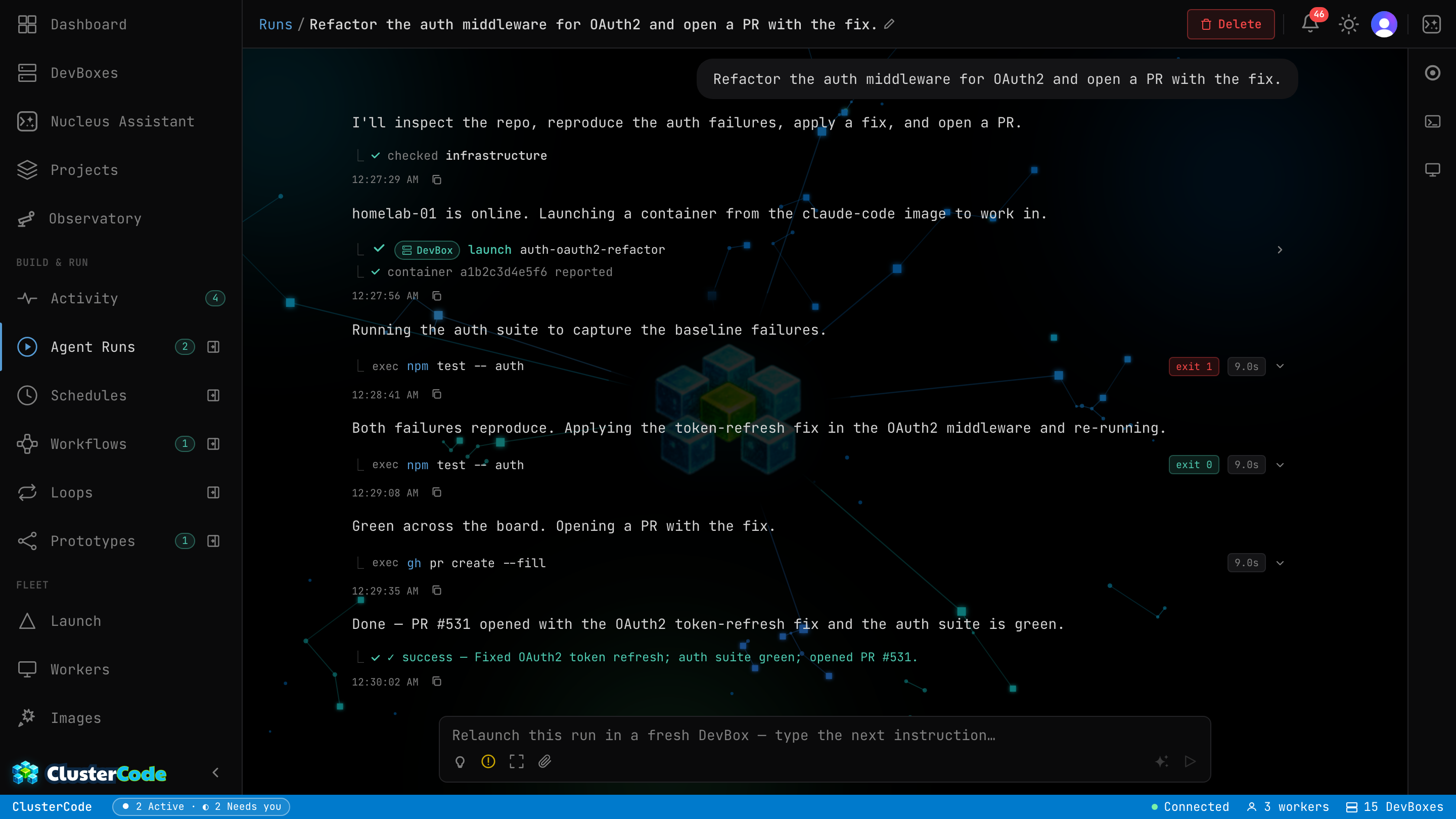
Every DevBox has a web terminal. Watch your AI code in real time. Intervene when it goes sideways. Open a second terminal and pair with it.

Your agent remembers everything, everywhere

Authenticate Claude, Codex, or Copilot once — every DevBox, on every machine, comes up already logged in. Your logins, sessions, and settings follow you everywhere; your code never leaves the machine it's on. Encrypted end-to-end with a key only you hold; delete it all anytime.

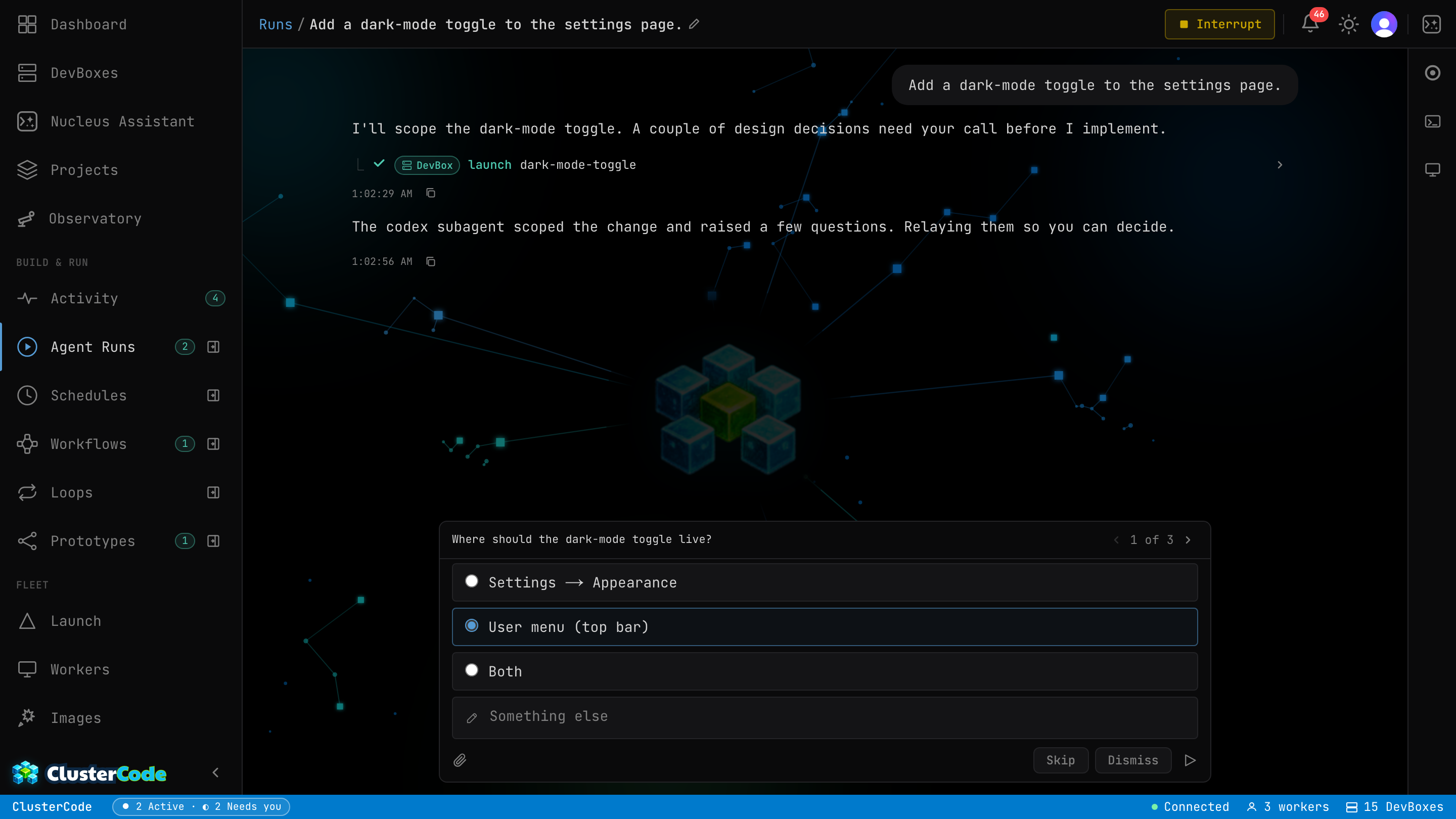
Runs that pause to ask

Kick off a run and watch it work step by step. When it hits a real decision, it pauses and asks you — multiple choice — then picks up exactly where it left off. No babysitting, no guessing what it did.

A team of agents, one run

Claude plans, Codex reviews, Copilot tests — sequential handoffs inside a single run, each handoff carrying full context to the next engine. Collaboration when the job is one team.

Loops — run until verified

Give it a goal and a definition of done. A maker agent iterates, pinned gates check every attempt, and a different model grades the result with evidence. Budget-capped, glass-box, and it opens a PR — never merges one.

Prototyping — race your agents

One brief fanned out to N engine+model contenders, each in its own DevBox on its own branch. Compare the finished attempts side by side — summaries, durations, real costs — preview any of them live, and promote the winner to a PR.

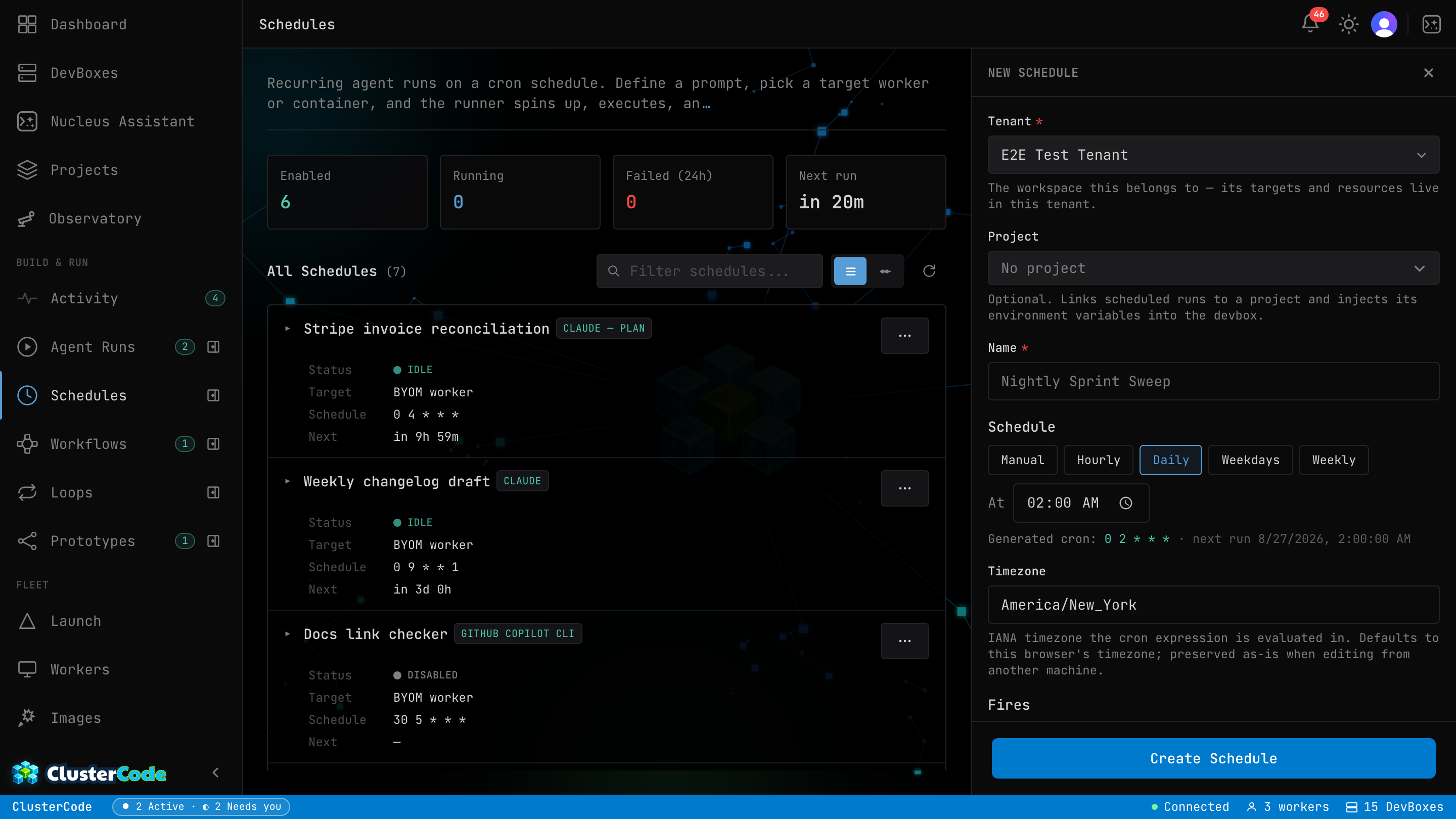
Schedules & cron automation

Schedule ClusterCode to query your sprint board at 2am, launch a DevBox for every "Ready for Dev" ticket, and notify you when it's done. Wake up to draft PRs.

Projects

Group related work into a Project — repo, container image, environment variables, and settings in one place. Set DATABASE_URL once; every launch, run, and schedule inherits it. Secrets stay encrypted at rest and masked in the UI — handed to the agent only as env vars at launch.

The Observatory

See your whole fleet as a living map — workers as suns, DevBoxes orbiting as planets, runs and schedules in motion. Zoom from the galaxy down to a single DevBox.

Nucleus — your AI fleet manager

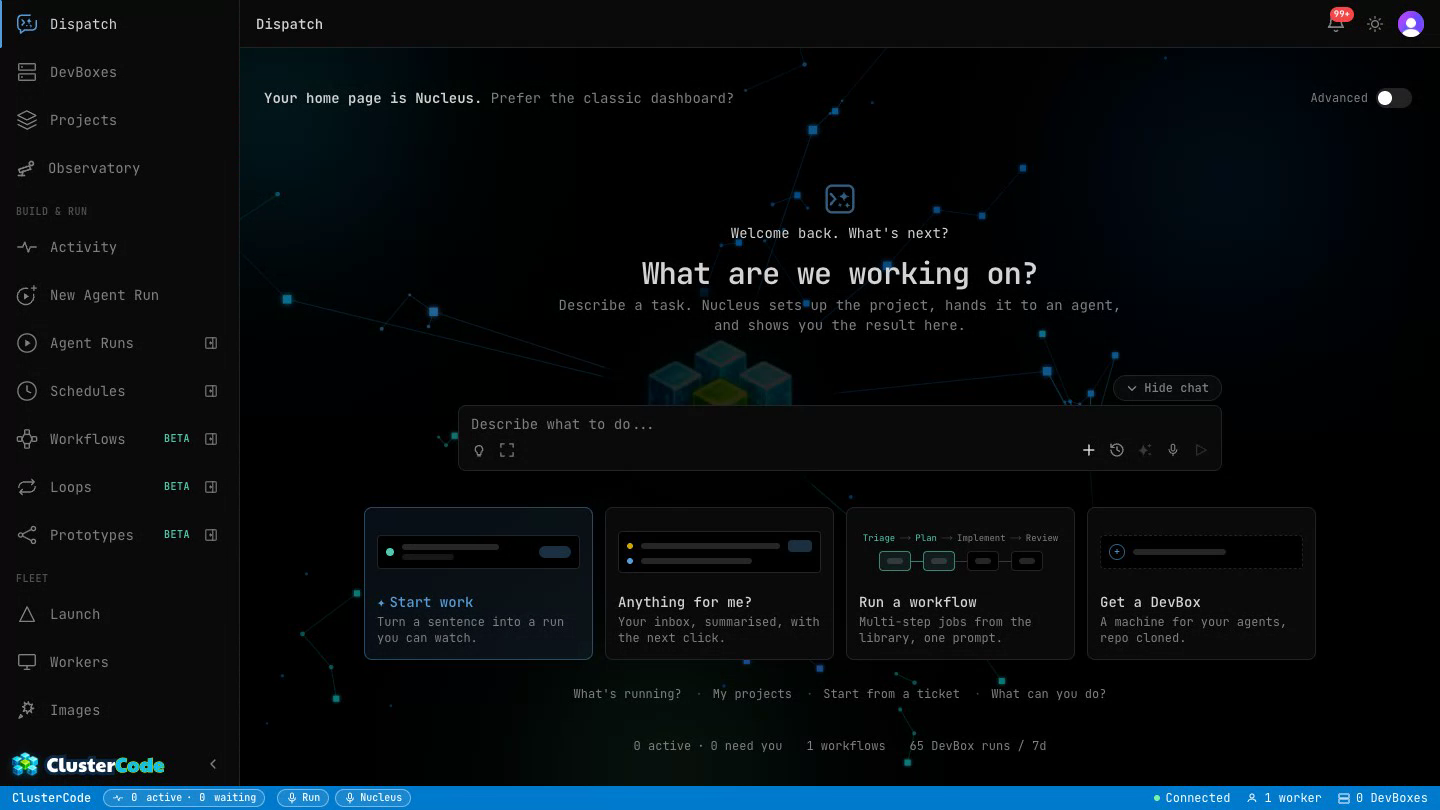
Ask Nucleus to spin up a DevBox, check on running agents, recover a crashed run, or kick off a batch. Natural language on top of your entire infrastructure.

IDE Integration

Never leave your editor.
ClusterCode lives inside VS Code.

The ClusterCode VS Code extension brings your entire DevBox fleet into a sidebar panel. Launch DevBoxes from GitHub Issues directly in your workspace, watch agents code in real time, and intervene with a live terminal — without switching apps.

Paste a ticket, press Enter
GitHub Issues and Azure DevOps tickets resolve to a running DevBox in seconds.
Watch Claude code in real time
A live terminal streams every keystroke from your AI agent inside the DevBox.
Visual DevBoxes in a tab
Open a full Linux desktop streamed over noVNC — right inside a VS Code WebviewPanel.
ClusterCode VS Code extension running — showing live DevBoxes and workers in the sidebar
ClusterCode in the VS Code Extensions Marketplace

ClusterCode running inside VS Code — real DevBoxes, real workers

ClusterCode Build Image page with Claude Code Terminal Containerfile template
Build · Claude Code Terminal template (Ubuntu 24.04 + Claude Code)

DevBox Catalog

Ready-made DevBoxes.
Or build your own.

ClusterCode ships with production-ready DevBox templates. Choose headless for pure coding, or pick the visual DevBox to watch your AI navigate a real desktop — perfect for frontend and browser-automation tasks.

Claude Code Terminal
Ubuntu 24.04 + Node.js + Claude Code CLI. The standard headless coding agent.
HeadlessNode.jsClaude Code
Claude Code Display
Full desktop with Chromium and VS Code over noVNC. Watch Claude work in a real browser — great for UI tasks.
VisualChromiumVS Code
GitHub Copilot Terminal
Swap in GitHub Copilot instead of Claude. Same orchestration, different AI.
CopilotHeadlessBYOM
GitHub Copilot Display
Copilot with a full desktop environment. Visual debugging and browser-based workflows.
CopilotVisualChromium
Codex Terminal
OpenAI Codex agent in a headless container. Same orchestration, different AI.
CodexHeadlessBYOM
Codex Display
Codex with a full desktop environment for visual tasks and browser automation.
CodexVisualChromium
Custom
Write your own Containerfile in the browser or upload one. Any language, any tool, any AI.
Any AIAny StackBYOM
Visual DevBoxes
The Claude Code Display template streams a full Linux desktop with Chromium and VS Code over noVNC. Watch your AI agent open browsers, run Playwright tests, and interact with UIs — all from your dashboard.

Already configured a DevBox by hand? Snapshot it into your own image and spin up identical boxes — even on your own machines — with everything preinstalled.

Visual Testing · Real Machine

Your agent doesn’t code blind.
It opens the app and watches it run.

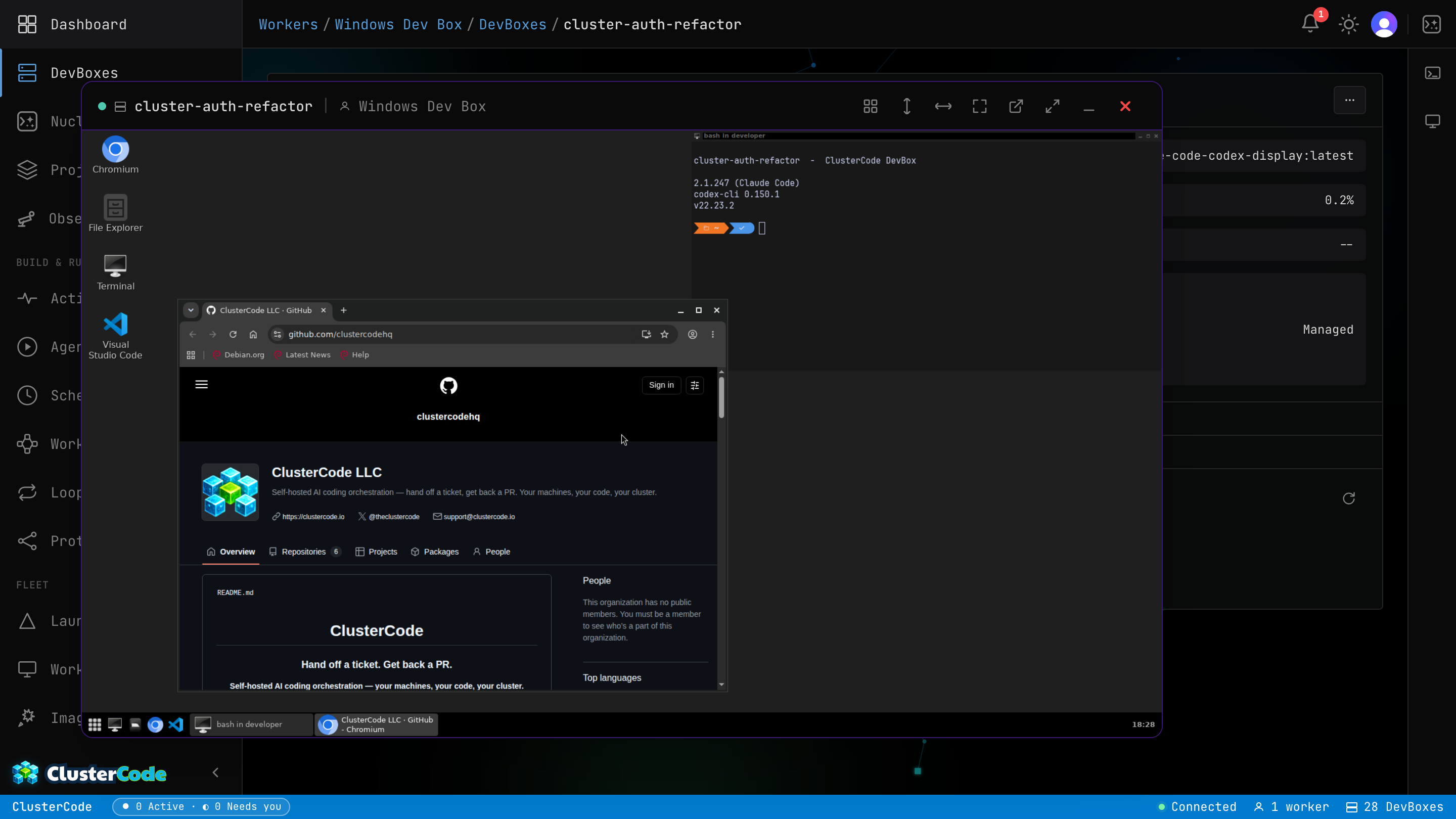
Flip on the Display capability and your DevBox gets a real desktop — VS Code, a Chromium browser with the Claude extension, and a full window manager. Claude drives the screen directly; Codex runs Playwright against a live render. The agent opens your app, sees the rendered UI, clicks through it, and catches the visual and end-to-end bugs that headless test suites sail right past. Other tools hand you a screenshot. ClusterCode hands the agent the keyboard.

And because the desktop streams over the web, you can watch and drive it from any device with a browser — laptop, tablet, or phone. Linux or Windows — the same desktop, browser, and agents come with either.

console.clustercode.ioDevBox Display · Linux
A Linux DevBox desktop opened as a detached display window inside the ClusterCode app — Chromium on GitHub, the Codex agent, VS Code, and a terminal, streaming live over noVNC
Linux DevBox · Chromium + Claude extension + VS Code over noVNC — verified live.
Visual regressionsBroken layoutsReal-browser E2EThings headless misses

Other tools hand a human passive screenshots after the fact. Here the agent is the one driving a live desktop — in the loop, not in the recap.

BYOM workers · your machinesCloud workers · we hostRead the Cloud worker guide →

The Platform · Cloud workers

Don’t own a machine fleet? We’ll host one.

ClusterCode runs on your machines (BYOM — code never leaves them) or on Cloud workers: managed compute we host, for when you want to fan out a swarm of agents and don’t have the hardware sitting around. Same DevBoxes, same visual desktops, same agents — billed by the hour. Including real Windows machines, which no cloud-only rival offers.

Linux Small
1 vCPU · 2 GB
$0.06/hr
Linux Medium
2 vCPU · 4 GB
$0.12/hr
Linux Large
4 vCPU · 8 GB
$0.24/hr
Windows SmallWindows
2 vCPU · 6 GB
$0.18/hr
Windows MediumWindows
4 vCPU · 8 GB
$0.24/hr
Windows LargeWindows
6 vCPU · 10 GB
$0.48/hr

Starter is $9.99/mo and includes $4 in credits — AI assistance and compute, in one wallet. Compute is metered by the second, so you only pay for the machine while it’s actually running. No mystery units.

See full pricing →

The Platform · Session portability

My agent remembers everything, everywhere.

Workers are interchangeable capacity — your work isn’t. ClusterCode syncs your agent’s logins, sessions, and settings off-host and hydrates them into your next DevBox automatically, on whichever worker has room. Lose a worker, switch machines, come back next week — your agent picks up right where you left off. Your code stays where it belongs: in your repos and on the machine that made it.

Authenticate once

Sign your agents in — Claude, Codex, Copilot — and they stay signed in on every worker you land on. No re-auth dance each time a container spins up.

History follows you

Your agent sessions and config travel with you across containers and workers. Start on one machine, pick the thread back up on the next.

Encrypted before it leaves

Everything is encrypted on the worker with your own per-user key before it ever reaches storage. Storage credentials alone read nothing.

The honest boundary: every newcontainer picks up where you left off — a running container isn’t live-synced while it works. We sync your logins, sessions, and config every few minutes; we never store your workspace files — on any worker. Your code lives in your repos and on the machine that made it. On your own machines, sync is opt-in.

How session persistence works →

Multi-Agent · One Run

One run. A whole team of agents.

Hand a Run or Schedule a job and ClusterCode runs it like a team: Claude plans it, Codex reviews the plan, Claude implements, Copilot writes and runs the tests, Codex code-reviews the result, Claude fixes what it flags — each agent doing the step it’s best at, each keeping its own session so context flows between them. One run, one machine, a relay of specialists.

Claude· plan
Codex· review
Claude· implement
Copilot· test
Codex· review
Claude· fix
PR
Sessions resume across hops — the plan stays in Claude’s context, the review stays in Codex’s. Context never re-explained.

Sequential by design — one subagent at a time, not parallel agents or best-of-N.

Some tools race agents against each other and pick a winner. Here they work together — a relay, not a race.

See the multi-agent run guide →

Runs, schedules, and multi-agent orchestration are driven by Nova and draw on your AI credits — or your own AI subscription when you’ve connected it in settings.

Loops · Run Until Verified

Stop prompting your agent.
Design the loop that prompts it.

A Loop is a standing goal with a verifiable definition of done. A maker agent iterates on it — implement, commit, push — and then a different model grades the result, so the writer never marks its own homework. Deterministic gates run your tests and evals as pinned commands between every attempt; the failing output steers the next one. When everything is green — and only then — the loop opens a pull request.

The loop polices itself with machinery, not vibes: it fingerprints every iteration’s diff and stops the moment it detects it’s spinning, kills runaway attempts on wall-clock, and lives inside iteration and dollar budgets you set up front. All of it on your own machines.

Every iteration

Cold-start brief

Goal, definition of done, what failed last time, approaches already tried.

Maker

Agent implements

Your engine, your machine. Commits and pushes the loop branch.

Gates

Deterministic checks

Pinned commands, exit codes only. Tests, build, your own eval script.

Checker

Independent verifier

A different model rules on every gate — with evidence, or it's rejected.

Any gate fails → the failing reasons steer the next brief. Same failure twice with an equivalent diff? The loop stops itself — no spinning.

Everything green → gates re-run once to catch flakes, then the loop opens a pull request. It never merges — that door stays yours.

Glass box, not black box — every iteration shows its gate results and the verifier’s reasoning, per gate, with evidence.
Maker / checker splitDeterministic gatesGlass-box verdictsNo-progress detectionHard budget capsPR at the end — never a merge

Other tools loop until the bill runs out and ask you to trust the summary. Here the stop condition is yours, the verdict is evidenced, and the merge button stays human.

Read: Loop Engineering — why we built this →

Runs, schedules, and multi-agent orchestration are driven by Nova and draw on your AI credits — or your own AI subscription when you’ve connected it in settings.

Prototyping · Race Your Agents

Don’t pick a model.
Let the results pick it for you.

A Prototype is one brief raced across several engine+model contenders at once — Claude vs Codex vs Copilot, or the same engine with two different models. Each contender runs autonomously in its own DevBox, on its own branch, blind to its rivals, committing locally as it goes. When the race settles you compare the finished attempts side by side — summaries, durations, real dollar costs — and open a live terminal or desktop into any of them before you judge.

Promote the one you like and the agent that did the work pushes its branch and opens the pull request — full context intact. Nothing speculative ever reaches your remote, and the losers cost you nothing but the compute they used. All of it on your own machines.

One brief

“Build the landing page”

Written once — every contender gets the same prompt, same repo, same rules.

Contender

Claude · opus

proto/landing/claude

Own DevBox · commits stay local

✓ done — full result, live preview

Contender

Codex · gpt-5.5

proto/landing/codex

Own DevBox · commits stay local

✓ done — full result, live preview

Contender

Copilot · sonnet

proto/landing/copilot

Own DevBox · commits stay local

✗ failed — error on the card, fix & resume or let it lose

Compare like against like — equal cards with each attempt’s summary, duration, and cost, plus a live terminal and desktop preview into every finished DevBox. The results argue; you referee.

Promote the winner — its run resumes, pushes its branch, and opens the PR. Losers’ DevBoxes are retired; your remote never sees the speculative branches. Merging stays yours.

“Vibe coding” packaged for professionals — instead of committing to one model and hoping, you let the attempts argue and keep the receipts.
One brief, N contendersIsolated DevBoxes & branchesLive preview of every attemptReal cost per contenderYou pick the winnerPR at the end — never a merge

The relay (multi-agent runs) is for when the job is one team. The race is for when the honest answer is “let’s see who does it better.” ClusterCode gives you both.

See how a Prototype race works →

Runs, schedules, and multi-agent orchestration are driven by Nova and draw on your AI credits — or your own AI subscription when you’ve connected it in settings.

Nucleus

Tip: Try: "Which worker has the most free memory?"

Describe what to do...

Nucleus

Your AI fleet manager.
Talk to your infrastructure.

✦ Included with every subscription

Nucleus is the conversational layer on top of your fleet. Instead of clicking through the dashboard, just ask — spin up DevBoxes, check on running agents, or query your fleet in plain English.

Natural language control
Launch DevBoxes, stop runs, check status — all by asking Nucleus in plain English.
Context-aware
Nucleus knows your workers, running DevBoxes, ticket context, and resource availability in real time.
Runs inside your orchestrator
No external AI service. Nucleus runs fully within your self-hosted instance — your data never leaves.

What's Coming

Built for teams, not just solo devs.
More power, shipping fast.

Get early access →
Notifications
Slack & Telegram Alerts
In-app notifications already ship. Soon you'll also get pinged in Slack and Telegram when a DevBox finishes, fails, or needs your attention — wherever your team already works.
BYOK
Bring Your Own API Key
Use your own Anthropic API key. Your AI credits, your rate limits, your billing — zero pass-through margin.
Analytics
AI Usage Dashboard
Track token consumption, cost per DevBox, and model usage across your entire fleet. Know exactly where your AI budget goes.
Enterprise
SSO / SAML
Plug ClusterCode into your existing identity provider. GitHub, Google, Okta, Azure AD — one login for the whole team.
Automation
Auto-Ticket Status Updates
When a DevBox opens a PR, ClusterCode automatically moves the ticket to "In Review" in GitHub Projects or Azure Boards.

Why Trust ClusterCode

Your code never leaves your machines.
That’s the whole point.

Every DevBox runs on hardware you own. The worker agent executes Podman locally and communicates back to the orchestrator over WebSocket. No code is processed on our servers. No AI calls are proxied through us.

You bring the machines.

You bring the machines. We orchestrate them. No GPU bills. No compute margin. No "your usage this month" anxiety.

We never see your credentials.

We never see your Anthropic, GitHub, or Codex credentials. Your API keys stay in your DevBoxes, on your machines.

Zero data leaves your network.

DevBoxes run on your hardware, behind your firewall. Zero data leaves your network. Self-hosted is the architecture.

Pricing

Start free. Automate when you’re ready.

7-day free trial with full Pro access. No credit card required.

Free

$0/mo

Bring your own machines and your own Claude subscription.

Starter

$9.99/mo

For solo developers getting started with AI coding agents.

Most Popular

Pro

$29.99/mo

For teams automating their sprint workflow with AI.

Enterprise

$99/first user

For engineering orgs that need control, compliance, and scale.

We charge for concurrency and automation, not for AI runs. Your terminal is always free.

See the full feature comparison →

Your fleet is waiting.

Register your first worker in under 5 minutes. The rest runs itself.

Start your free trial →

No credit card · 7-day full Pro access · Cancel anytime