Features
One DevBox is a real machine for your agent.
ClusterCode runs a fleet of them.
Start with a single isolated DevBox — a real dev environment with a live terminal and an optional visual desktop. Then scale it into a platform: managed Cloud workers, autonomous Agent Runs, schedules, and an Observatory to watch it all.
Everyone can give an AI a sandbox. The hard part is giving it a real machine — and then a hundred of them, watched, on hardware you choose.
Tier 1 · The DevBox
A real machine for your agent.
Not a sandbox. Not a log stream.
Every task gets its own isolated DevBox — a container or full VM with git, node, and tmux baked in, a real shell, the AI runtime of your choice, and an optional visual desktop. A box your agent can see, drive, and break — safely. Open the live terminal whenever you want and take over.
Cloud workers
Managed compute for people who can’t spin up their own machines.
ClusterCode runs on your machines (BYOM — code never leaves them) or on Cloud workers: managed compute we host, for when you want to fan out a swarm of agents and don’t have the hardware. Linux from $0.06/hr; real Windows VMs when you need them. BYOM stays free of compute margin; Cloud workers are opt-in, metered by the second, and never required.
Visual Testing · The DevBox Desktop
Your agent doesn’t code blind. It sees the screen.
Turn on Display and the DevBox gets a real graphical desktop — Xvnc, openbox, noVNC — with VS Code and a Chromium that already has the Claude extension wired in. Claude drives the screen through computer-use; Codex runs Playwright against a live render. The agent opens your app, sees the rendered UI, clicks through it, and catches the visual and end-to-end bugs a headless run sails right past. Windows DevBoxes get the same desktop — watch and drive it from any device with a browser.
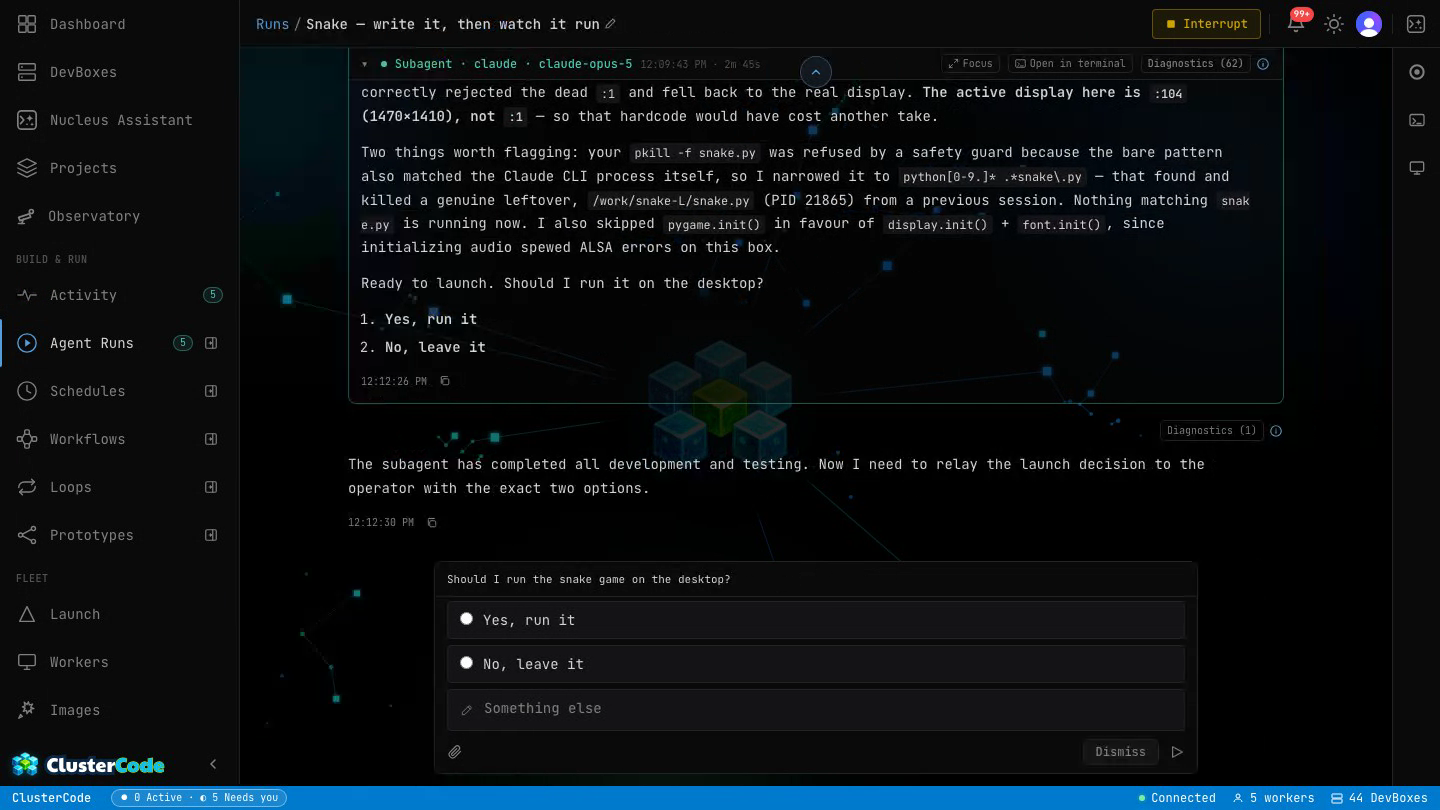
The agent verifies in the same DevBox it built in, on a real desktop you can watch and take over at any moment.
Windows · Real VMs
Real Windows DevBoxes. Every rival is Linux-only.
ClusterCode boots actual Windows DevBoxes — a real Windows VM under the hood — in three sizes. If your stack is .NET, your tests are Windows-only, or your app has to render on Windows to count, that’s not an edge case here; it’s a tier you pick. Same live terminal (PowerShell), same visual desktop — on Windows.
Coming soon: Agent Runs on Windows, for full feature parity with Linux.
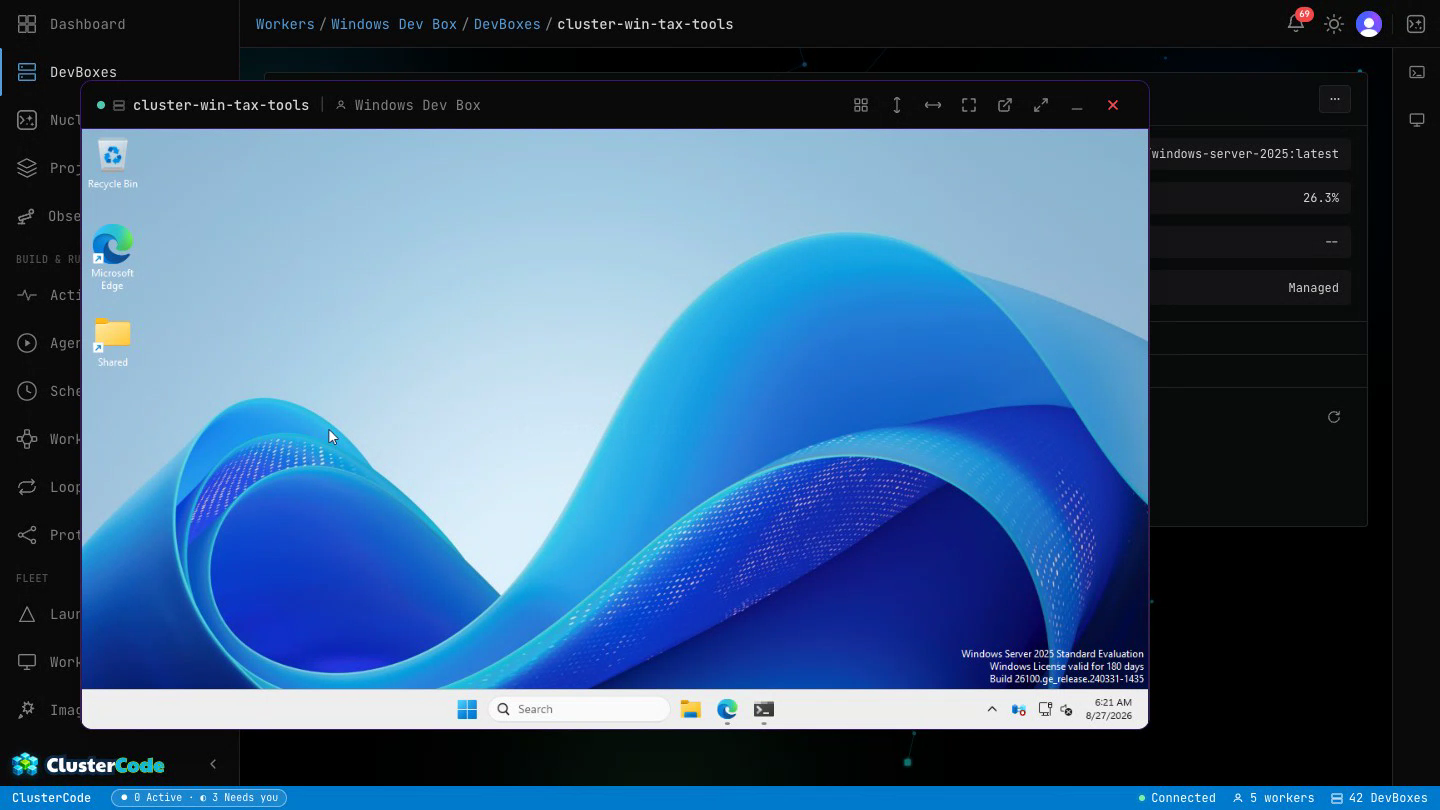
The cloud-only tools in the market: Linux cloud, full stop.
Images · Snapshot & Replicate
Configure one DevBox. Clone it forever.
Spend an afternoon getting a DevBox exactly right — your toolchain, your deps, your weird internal CLI, your fixtures. Then snapshot the whole running machine into your own image. Every DevBox you launch from it comes up pre-built: no Dockerfile to write, no setup to repeat, capabilities carried over automatically. Launch the clones on Cloud workers or on your own BYOM machines — same image, your choice of where.
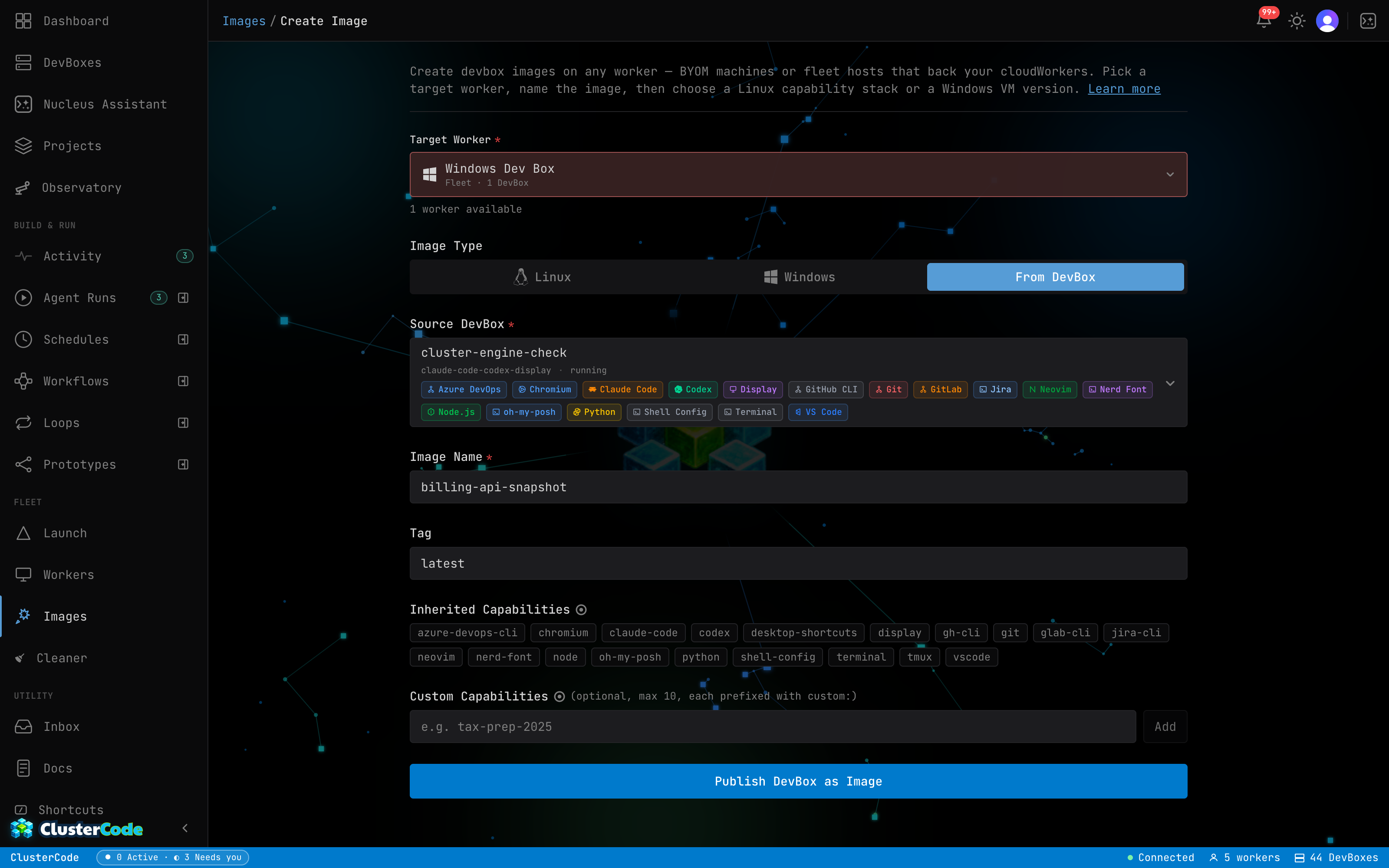
From a local image, a full DevBox — repo cloned, toolchain installed, agent ready — typically comes up in under 10 seconds, and in about 2 on fast hardware. Measured on real machines, not a marketing benchmark. The image build is a one-time cost; every launch after it is instant-feeling.
Read the image-from-DevBox guide →The Platform
One DevBox becomes an operation.
Projects pull the repo, image, and settings under one roof — and the environment variables that go with them. Those values stay encrypted at rest and masked throughout the console, surfaced in plaintext only inside the DevBox’s own environment when a launch begins.
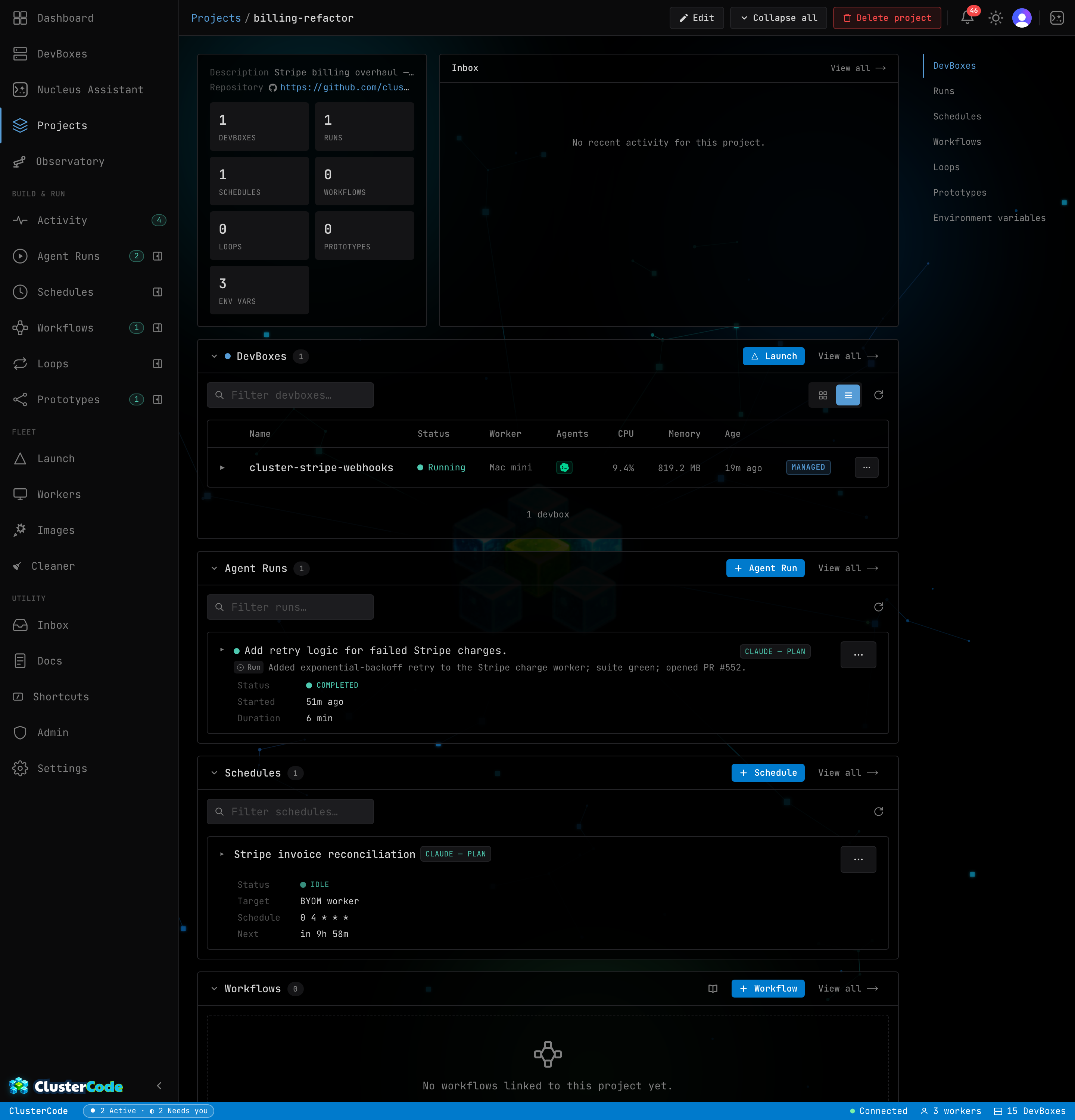
Runs, schedules, and multi-agent orchestration are driven by Nova and draw on your AI credits — or your own AI subscription when you’ve connected it in settings.
Multi-Agent · One Run
A relay of agents, not a race.
Hand a Run or Schedule a job and it runs like a team: Claude plans, Codex reviews the plan, Claude implements, Copilot writes and runs the tests, Codex code-reviews the result, Claude fixes what it flags — then opens the PR. Each engine keeps its own resumable session, so the plan stays in Claude’s context and the review stays in Codex’s; review findings route back to the right engine. Those sessions are durable, too — close the browser mid-run, reopen from another machine, and every agent resumes with its full context intact. Your work isn’t pinned to a tab, a laptop, or an office.
It’s sequential — one agent at a time, each picking up where the last left off. Not parallel agents, not best-of-N — a team that hands off, on one machine.
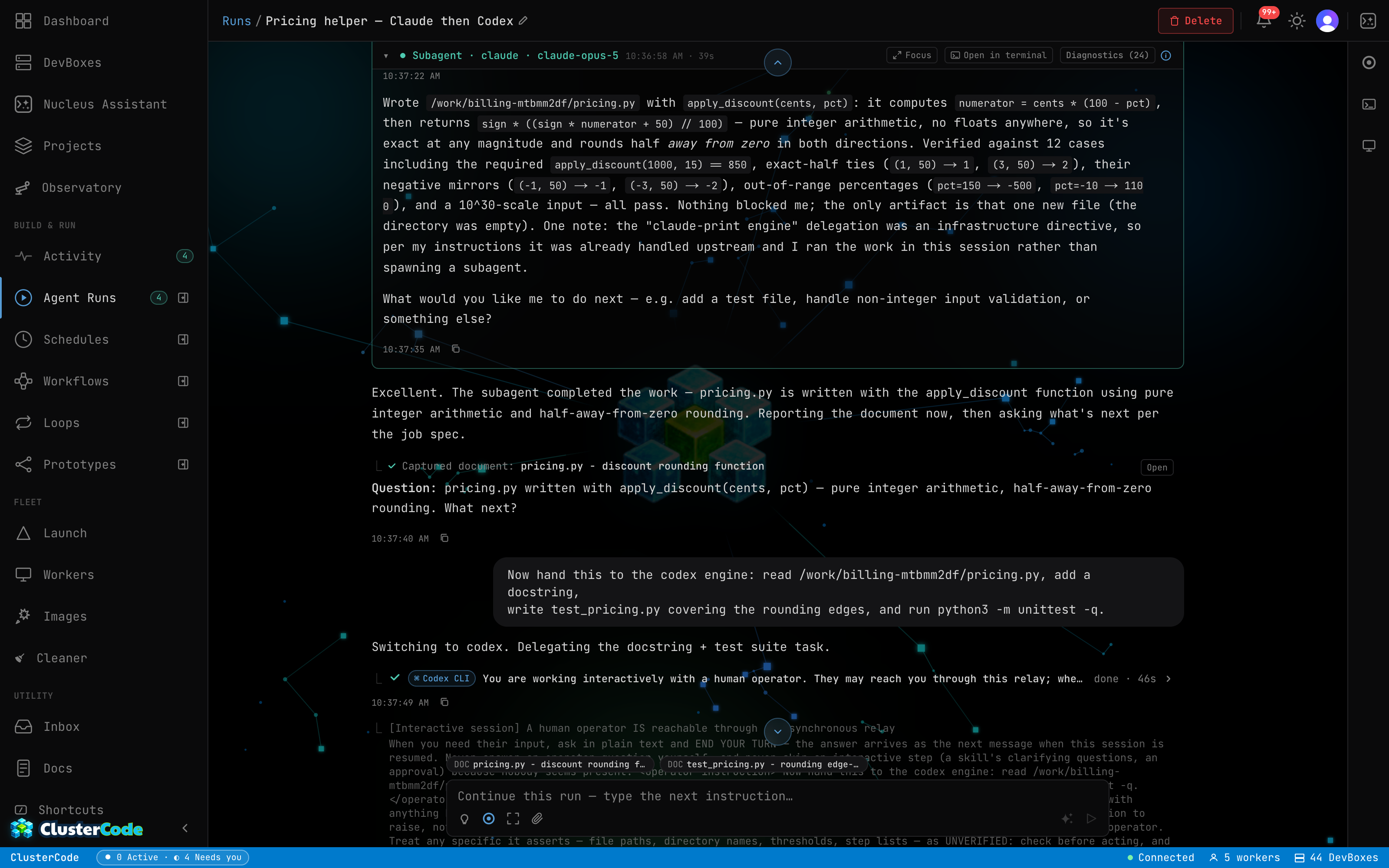
Collaboration when the job is one team — and when a race is the honest answer, that exists too: see Prototyping below.
See the multi-agent run guide →Runs, schedules, and multi-agent orchestration are driven by Nova and draw on your AI credits — or your own AI subscription when you’ve connected it in settings.
Loops · Run Until Verified
A goal that iterates until it’s verifiably done.
A Loop is a standing goal plus a definition of done you can actually check: tests pass, the build succeeds, your own eval script exits zero. A maker agent takes an iteration, commits, and pushes; deterministic gates run as pinned commands against the committed code; then an independent verifier — a different model — rules on every gate and must cite evidence, or its approval is rejected and re-run. Failing output becomes the next iteration’s brief. Green across the board opens a pull request. Merging stays yours.
The guardrails are deterministic, not model-judgment: diff fingerprinting stops a loop that repeats itself, wall-clock kills a runaway iteration, and iteration + dollar budgets are enforced by the orchestrator — the agent can’t talk its way past them. Edits to tests or CI config are flagged for scrutiny, never auto-passed.
Every iteration
Cold-start brief
Goal, definition of done, what failed last time, approaches already tried.
Maker
Agent implements
Your engine, your machine. Commits and pushes the loop branch.
Gates
Deterministic checks
Pinned commands, exit codes only. Tests, build, your own eval script.
Checker
Independent verifier
A different model rules on every gate — with evidence, or it's rejected.
Any gate fails → the failing reasons steer the next brief. Same failure twice with an equivalent diff? The loop stops itself — no spinning.
Everything green → gates re-run once to catch flakes, then the loop opens a pull request. It never merges — that door stays yours.
Every iteration is a Run you can open: the diff, the gate outputs, and the verifier’s per-gate reasoning — a glass box, not a progress bar.
Watch a loop run
A standing goal plus machine-checkable done-when gates.
Your engine writes the code, commits, pushes the loop branch.
Deterministic checks run against the committed diff.
A different model grades it. All green → PR. Any red → back around.
Runs, schedules, and multi-agent orchestration are driven by Nova and draw on your AI credits — or your own AI subscription when you’ve connected it in settings.
Prototyping · Race Your Agents
One brief, N contenders — the results decide.
A Prototype races the same brief across several engine+model contenders at once — Claude vs Codex vs Copilot, or one engine with two different models. Each contender runs autonomously in its own DevBox, on its own branch, blind to its rivals and committing locally as it goes — nothing speculative ever reaches your remote. When the race settles, the comparison cards put every attempt side by side: the agent’s own summary, duration, and the real dollar cost, with a live terminal and desktop preview into any finished DevBox.
Promote the winner and the agent that did the work — context intact — pushes its branch and opens the pull request. Losers are retired, their compute freed. Merging stays yours.
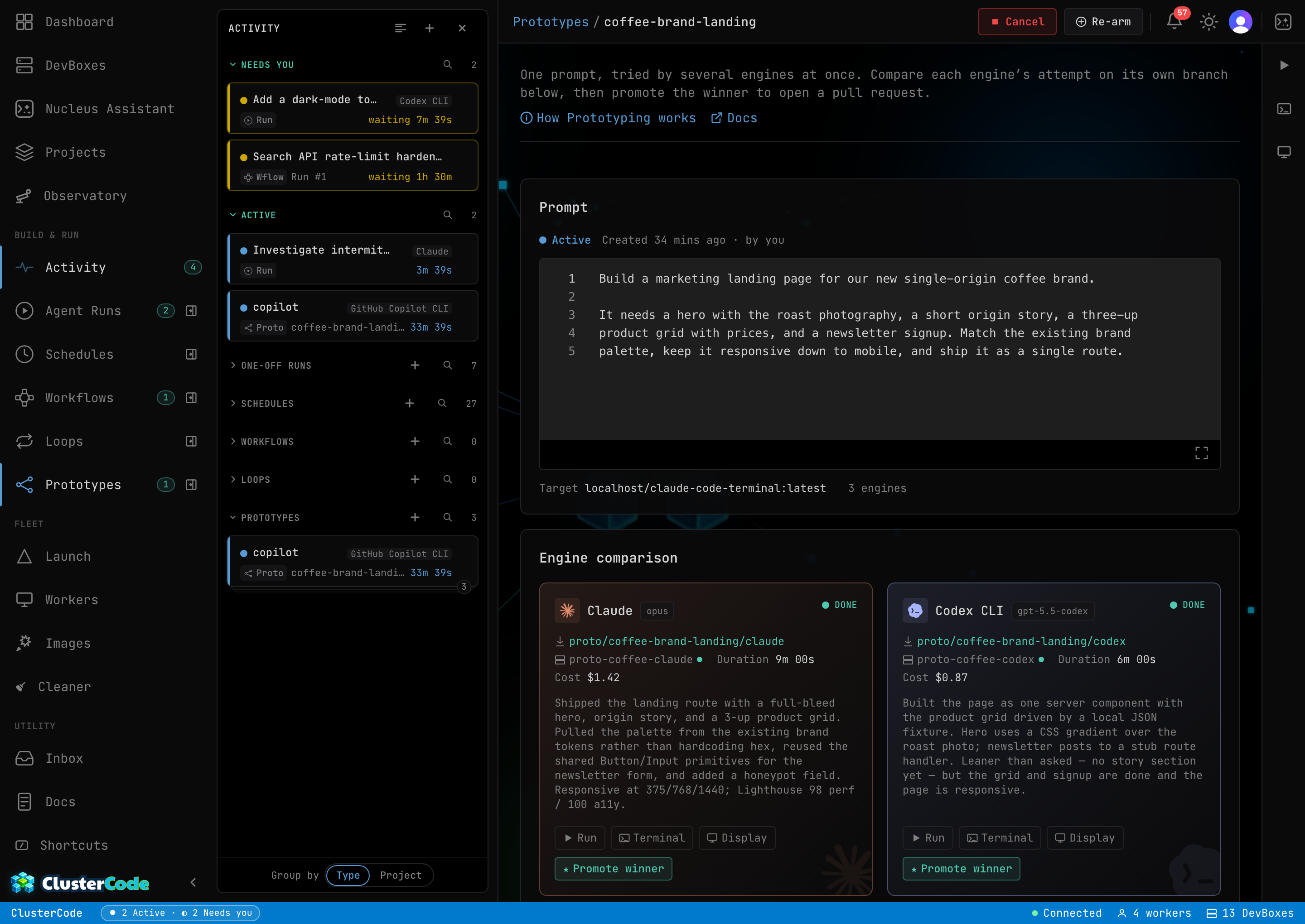
A real finished race — the durations and costs on the cards are the app’s own measured values, and the panel is a live desktop into a finished DevBox showing the actual page that contender built.
Watch a race settle
Written once. Every contender gets the same prompt, repo, and rules.
Own DevBox, own branch, blind to rivals. Commits and costs stay per-lane.
Equal cards: summary, duration, real cost — plus a live look inside each attempt.
The winner pushes its branch and opens the PR. Losers retire; your remote never saw them.
Runs, schedules, and multi-agent orchestration are driven by Nova and draw on your AI credits — or your own AI subscription when you’ve connected it in settings.
Workflows · Draw the Pipeline · Beta
Draw the lifecycle. Run it as a graph.
A Workflow is a canvas-drawn graph of the primitives above — agent Runs, Loops, and Prototype races as nodes — wired together with two routing nodes: a Decision that turns what just happened into exactly one labeled branch (the previous node’s status, a command’s exit code, or an agent’s judged verdict), and a human Approval that parks the run until you answer — from the run page or straight from the notification. Each firing walks the graph one node at a time in one shared DevBox on one branch, so every node builds on the last one’s commits.
Edges can point backward — review failed → go fix it → re-review — but every back-edge carries a traversal cap, so cycles are expressible and always bounded. A firing freezes the graph, so edits never touch runs already in flight; fire it by hand, from a Schedule, or over the API. In beta, like Loops and Prototyping.
Watch a run walk the graph
Variants race in their own DevBoxes; one result carries forward.
One autonomous agent run in the workflow’s shared DevBox and branch.
A full run-until-verified loop as one node — its stop reason routes onward.
Status, an exit code, or an agent verdict picks exactly one labeled branch.
The run parks for a human. Back-edges stay bounded by a traversal cap.
Runs, schedules, and multi-agent orchestration are driven by Nova and draw on your AI credits — or your own AI subscription when you’ve connected it in settings.
Cloud agents, compared
They run your code in their cloud.
We run it on a real machine — yours or ours.
The combination we bet on
- Workflows — draw your own software lifecycle from Runs, Loops, and Prototype races, with decisions and human approvals
- Claude, Codex, and Copilot as first-class engines with resumable sessions — relay them inside one run
- Your hardware — BYOM, code never leaves a machine you own
- The agent verifies on a real desktop you can watch and take over
- Real Windows DevBoxes
And the honest print
- $9.99/mo with $4 toward compute + AI app credits — solo-friendly
- Open-core — read the worker
- Loops, Prototyping, and Workflows are in beta — glass-box by design
- Mobile parity and multiplayer are roadmap, not shipped
We publish what we ship — judge us on the product, not a checkbox grid.
Supported AI agents
Three agents today. More on the way.
Every DevBox can run Claude Code, OpenAI Codex, or GitHub Copilot — each with your own key, nothing bundled, nothing marked up. The same agents power Agent Runs and Schedules.
More agents coming soon.
Out of the box
A DevBox comes loaded.
Full breakdown: runtime catalog · build an image from a DevBox.
Honest pricing
$9.99/mo = $4 in credits, metered by the second.
Credits cover both AI assistance and metered compute; heavier and Windows tiers cost more per second. BYOM compute carries no margin.
Your machine · Your key
Bring your own key. Your code never leaves your machine.
Bring your own key, run on your own machine — your code never leaves it. On BYOM workers the DevBox runs on hardware you own, so your source stays put while the agent works.
Session Persistence · Everywhere
Your agent remembers everything, everywhere.
Authenticate Claude, Codex, or Copilot once. Every DevBox you launch — on any machine, on any day — comes up already logged in. No re-pasting keys, no scanning a code again, no “please sign in.”
Encrypted before it ever leaves the worker, decrypted only back inside your own DevBox. Delete all of it anytime, with a 14-day recovery window. Only your logins and sessions sync — never your source, on any worker.
Glass box
Watch it work. Read the worker.
Most agent platforms are a black box: you submit, you wait, you get a PR and a vibe. ClusterCode is a glass box. The worker that runs your code is open-core — you can read it. Every DevBox has a live terminal you can watch in real time and take over at any moment. And the agent’s honesty guardrails — what it’s allowed to claim, how it has to verify — are spelled out, not hidden.
Read the security summary →