AI Workforce
Your AI workforce.
Your agents get real work, not chat. Tickets are assigned to Claude, Codex, and Copilot, each working in its own resumable session, so context carries from one step to the next instead of being re-explained. Results are verified the way you choose before they reach you: run the tests, have a second model review the work in a Loop or multi-agent run, or flip on the Display capability and let a real browser check the screen. The approval gates are yours to define, as hands-on or as autonomous as your workflow allows.
There are two ways to put an agent on a job, and the difference matters: a Run delivers the result, a launch hands you the machine.
Workflows · Draw the Pipeline · Beta
Draw the lifecycle.
Run it as a graph.
A Workflow is a canvas-drawn graph of your development process — agent Runs, Loops, and Prototype races as nodes — wired together with two routing nodes: a Decision that turns what just happened into exactly one labeled branch, and a human Approvalthat parks the run until you answer. Each firing walks the graph one node at a time in one shared DevBox on one branch, so every node builds on the last one’s commits.
Edges can point backward — review failed → go fix it → re-review — but every back-edge carries a traversal cap, so cycles are expressible and always bounded. This is where your team’s way of building software becomes something the workforce executes.
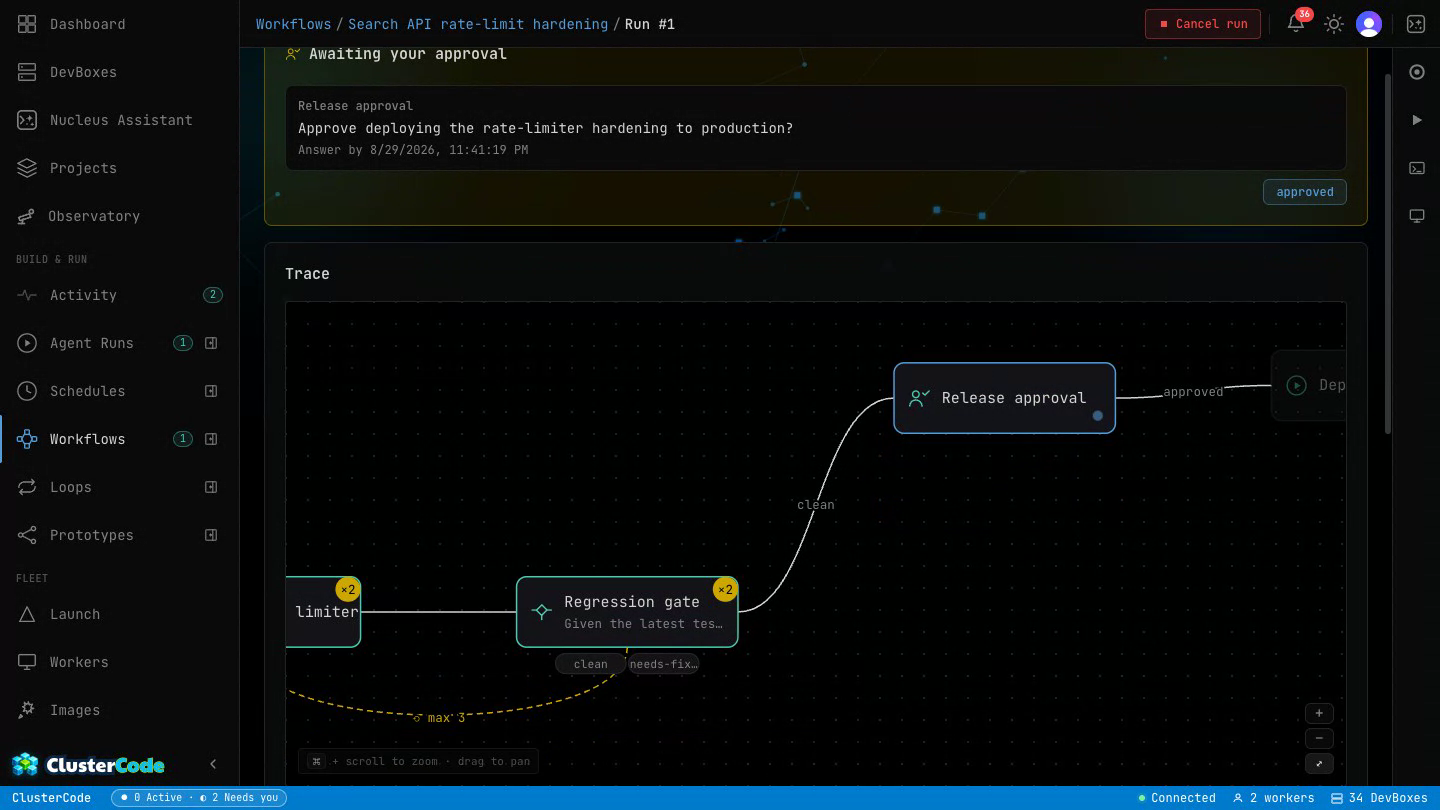
Variants race in their own DevBoxes; one result carries forward.
One autonomous agent run in the workflow’s shared DevBox and branch.
A full run-until-verified loop as one node — its stop reason routes onward.
Status, an exit code, or an agent verdict picks exactly one labeled branch.
The run parks for a human. Back-edges stay bounded by a traversal cap.
Runs, schedules, and multi-agent orchestration are driven by Nova and draw on your AI credits — or your own AI subscription when you’ve connected it in settings.
Loops · Run Until Verified
Stop prompting your agent.
Design the loop that prompts it.
A Loop is a standing goal with a verifiable definition of done. A maker agent iterates on it — implement, commit, push — and then a different model grades the result, so the writer never marks its own homework. Deterministic gates run your tests and evals as pinned commands between every attempt; the failing output steers the next one. When everything is green — and only then — the loop opens a pull request.
The loop polices itself with machinery, not vibes: it fingerprints every iteration’s diff and stops the moment it detects it’s spinning, kills runaway attempts on wall-clock, and lives inside iteration and dollar budgets you set up front. All of it on your own machines.
Every iteration
Cold-start brief
Goal, definition of done, what failed last time, approaches already tried.
Maker
Agent implements
Your engine, your machine. Commits and pushes the loop branch.
Gates
Deterministic checks
Pinned commands, exit codes only. Tests, build, your own eval script.
Checker
Independent verifier
A different model rules on every gate — with evidence, or it's rejected.
Any gate fails → the failing reasons steer the next brief. Same failure twice with an equivalent diff? The loop stops itself — no spinning.
Everything green → gates re-run once to catch flakes, then the loop opens a pull request. It never merges — that door stays yours.
Other tools loop until the bill runs out and ask you to trust the summary. Here the stop condition is yours, the verdict is evidenced, and the merge button stays human.
Read: Loop Engineering — why we built this →Runs, schedules, and multi-agent orchestration are driven by Nova and draw on your AI credits — or your own AI subscription when you’ve connected it in settings.
Prototyping · Race Your Agents
Don’t pick a model.
Let the results pick it for you.
A Prototype is one brief raced across several engine+model contenders at once — Claude vs Codex vs Copilot, or the same engine with two different models. Each contender runs autonomously in its own DevBox, on its own branch, blind to its rivals, committing locally as it goes. When the race settles you compare the finished attempts side by side — summaries, durations, real dollar costs — and open a live terminal or desktop into any of them before you judge.
Promote the one you like and the agent that did the work pushes its branch and opens the pull request — full context intact. Nothing speculative ever reaches your remote, and the losers cost you nothing but the compute they used. All of it on your own machines.
One brief
“Build the landing page”
Written once — every contender gets the same prompt, same repo, same rules.
Contender
Claude · opus
proto/landing/claude
Own DevBox · commits stay local
✓ done — full result, live preview
Contender
Codex · gpt-6-sol
proto/landing/codex
Own DevBox · commits stay local
✓ done — full result, live preview
Contender
Copilot · sonnet
proto/landing/copilot
Own DevBox · commits stay local
✗ failed — error on the card, fix & resume or let it lose
Compare like against like — equal cards with each attempt’s summary, duration, and cost, plus a live terminal and desktop preview into every finished DevBox. The results argue; you referee.
Promote the winner — its run resumes, pushes its branch, and opens the PR. Losers’ DevBoxes are retired; your remote never sees the speculative branches. Merging stays yours.
The relay (multi-agent runs) is for when the job is one team. The race is for when the honest answer is “let’s see who does it better.” ClusterCode gives you both.
See how a Prototype race works →Runs, schedules, and multi-agent orchestration are driven by Nova and draw on your AI credits — or your own AI subscription when you’ve connected it in settings.
Multi-Agent · One Run
One run. A whole team of agents.
Hand a Run or Schedule a job and ClusterCode runs it like a team: Claude plans it, Codex reviews the plan, Claude implements, Copilot writes and runs the tests, Codex code-reviews the result, Claude fixes what it flags — each agent doing the step it’s best at, each keeping its own session so context flows between them. One run, one machine, a relay of specialists.
Sequential by design — one subagent at a time, not parallel agents or best-of-N.
Some tools race agents against each other and pick a winner. Here they work together — a relay, not a race.
See the multi-agent run guide →Runs, schedules, and multi-agent orchestration are driven by Nova and draw on your AI credits — or your own AI subscription when you’ve connected it in settings.
Everything the workforce can do:
What Makes It Different
Built for developers who want
control and automation at the same time.
Bring Your Own Machine
Your workers are your compute. A spare laptop. A home server. A $6/mo VPS. ClusterCode orchestrates them all — no GPU bills, no vendor compute margin, no lock-in.
Container-agnostic AI
Write a Containerfile. Put Claude Code inside. Or Codex. Or Copilot. Or a fine-tuned model you built yourself. ClusterCode doesn't care what's in the container.
Ticket-driven provisioning
Paste a GitHub issue and a fully-provisioned dev environment appears — repo cloned, branch checked out, CLAUDE.md written with the full ticket context.
Ready in seconds
From click to live terminal in under 10 seconds on a stock worker — about 2 on a fast one. Everything already installed: repo, toolchain, your AI engine. The image build happens once; launches are free after that.
Live terminal. Always.
Every DevBox has a web terminal. Watch your AI code in real time. Intervene when it goes sideways. Open a second terminal and pair with it.
Your agent remembers everything, everywhere
Authenticate Claude, Codex, or Copilot once — every DevBox, on every machine, comes up already logged in. Your logins, sessions, and settings follow you everywhere (opt-in on your own machines); your code never leaves the machine it's on. Encrypted on the worker with a per-user key before it's stored; delete it all anytime.
Runs that pause to ask
Kick off a run and watch it work step by step. When it hits a real decision, it pauses and asks you — multiple choice — then picks up exactly where it left off. No babysitting, no guessing what it did.
A team of agents, one run
Claude plans, Codex reviews, Copilot tests — sequential handoffs inside a single run, each handoff carrying full context to the next engine. Collaboration when the job is one team.
Loops — run until verified
Give it a goal and a definition of done. A maker agent iterates, pinned gates check every attempt, and a different model grades the result with evidence. Budget-capped, glass-box, and it opens a PR — never merges one.
Prototyping — race your agents
One brief fanned out to N engine+model contenders, each in its own DevBox on its own branch. Compare the finished attempts side by side — summaries, durations, real costs — preview any of them live, and promote the winner to a PR.
Workflows — draw the pipeline
Draw a graph of the primitives above — Runs, Loops and Prototype races as nodes — wired with decisions that route on what actually happened and approvals that park the run until a human answers. Fire it manually or on a schedule; one shared DevBox, one branch, each node building on the last.
Schedules & cron automation
Schedule ClusterCode to query your sprint board at 2am, launch a DevBox for every "Ready for Dev" ticket, and notify you when it's done. Wake up to draft PRs.
Projects
Group related work into a Project — repo, container image, environment variables, and settings in one place. Set DATABASE_URL once; every launch, run, and schedule inherits it. Secrets stay encrypted at rest and masked in the UI — handed to the agent only as env vars at launch.
The Observatory
See your whole fleet as a living map — workers as suns, DevBoxes orbiting as planets, runs and schedules in motion. Zoom from the galaxy down to a single DevBox.
Nucleus — your AI fleet manager
Ask Nucleus to spin up a DevBox, check on running agents, recover a crashed run, or kick off a batch. Natural language on top of your entire infrastructure.
Visual Testing · Real Machine
Your agent doesn’t code blind.
It opens the app and watches it run.
Flip on the Display capability and your DevBox gets a real desktop — VS Code, a Chromium browser with the Claude extension, and a full window manager. Claude drives the screen directly; Codex runs Playwright against a live render. The agent opens your app, sees the rendered UI, clicks through it, and catches the visual and end-to-end bugs that headless test suites sail right past. And it all happens in the same DevBox the agent built in — with you able to watch the desktop and take the keyboard at any moment.
And because the desktop streams over the web, you can watch and drive it from any device with a browser — laptop, tablet, or phone. Linux or Windows — the same desktop, browser, and agents come with either.
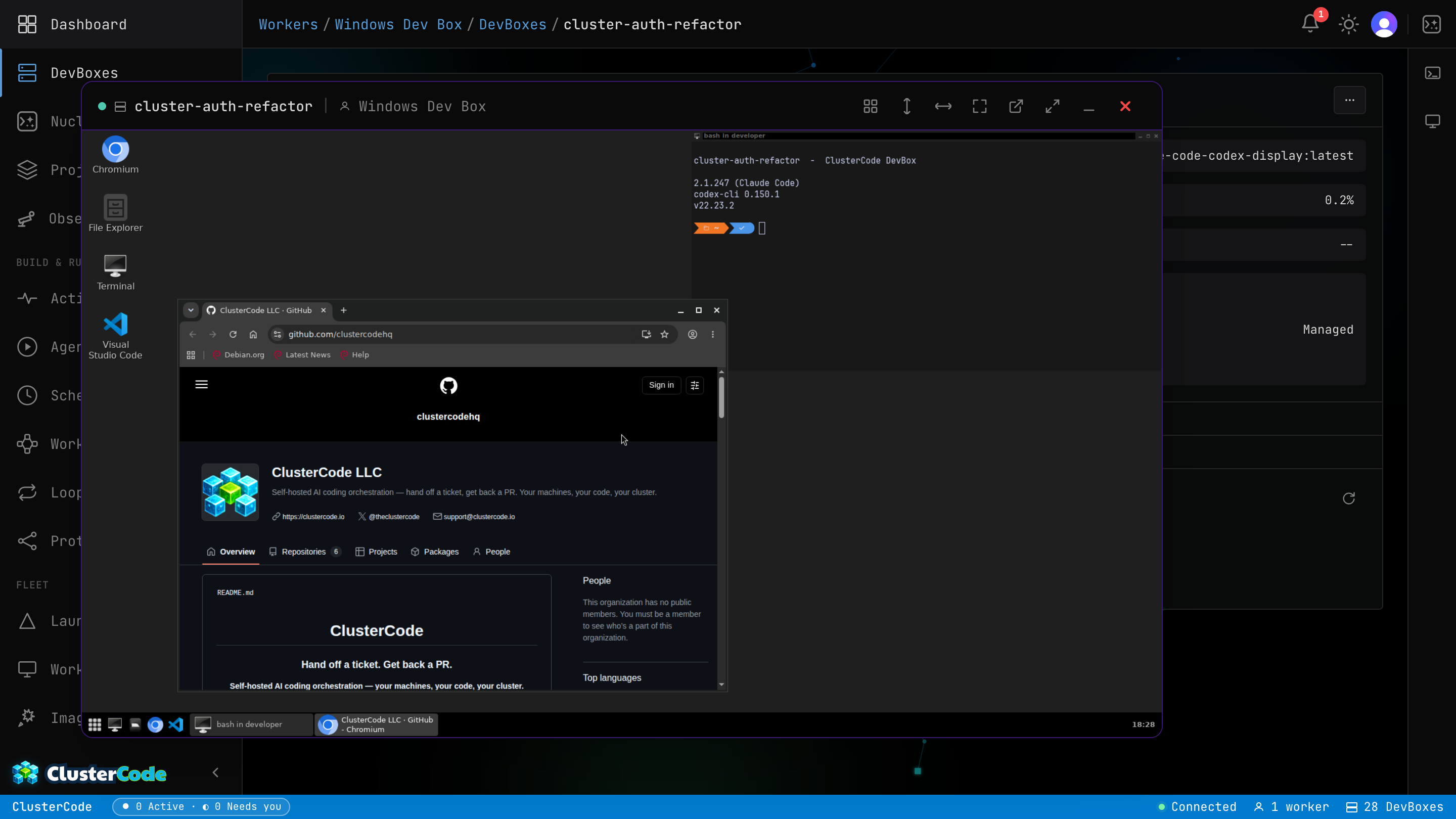
The agent verifies in the same DevBox it built in, on a desktop you can watch and take over at any moment — in the loop, not in the recap.
Tip: Try: "Which worker has the most free memory?"
Nucleus
Your AI fleet manager.
Talk to your infrastructure.
Nucleus is the conversational layer on top of your fleet. Instead of clicking through the dashboard, just ask — spin up DevBoxes, check on running agents, or query your fleet in plain English.
Put your workforce to work.
Assign the first ticket today. You decide what ships.
No credit card · 7-day full Pro access · Cancel anytime